Rapid TIFF Count 1.02 review
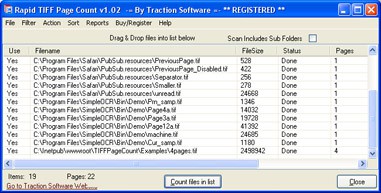
DownloadRapid TIFF Page Count will show you how many pages are in many TIFF's
|

|
Rapid TIFF Count 1.00 is other software developed by Traction Software.
Rapid TIFF Page Count will show you how many pages are in many TIFF's and generate reports for you with a few mouse clicks.
Features include: count file size, pages & number of files, directory scanner for bulk files, file drag and drop support, save,load & append lists, continue counting from previous session, reporting options for text and csv files, sorting options, add and delete files or disable from use + much more!
This other software is shareware, which means you can download and use Rapid TIFF Count 1.00 for free during the trial period (usually for 30 days). At the expiration of the period you will have to buy the other product for $89.95. Rapid TIFF Count 1.00 is available at regnow and Traction Software website.
Rapid TIFF Count 1.00 supports English interface languages and works with Windows 98/XP/Vista.
We have tested Rapid TIFF Count 1.00 for spyware and adware modules. The software is absolutely safe to install.
We has completely tested other software Rapid TIFF Count 1.00 many times, written and published the interesting article and uploaded installation file (1342K) to our fast server.
Downloading Rapid TIFF Count 1.00 will take minute if you use fast ADSL connection.